Microsoft 365 Lighthouse Integration
This is the story of an 18-hour debugging session that ended with a single API endpoint solving everything.
The Problem
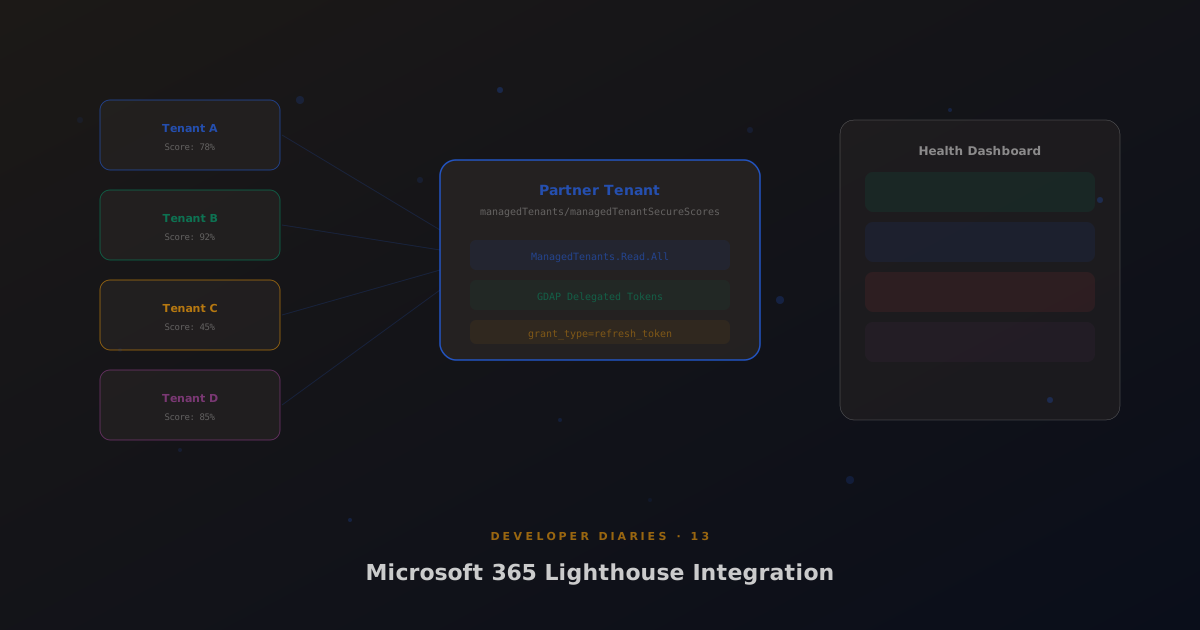
Microsoft 365 Lighthouse lets MSPs monitor their managed tenants, secure scores, device compliance, user risk. We wanted to pull secure score data into MSP Hub’s health dashboard. Simple, right?
The Wall
Cross-tenant Security API calls under GDAP don’t work the way you’d expect. Even with proper delegated tokens (using grant_type=refresh_token through the Secure Application Model), the /security/secureScores endpoint returns empty for managed tenants. Not an error, just empty results.
We tried app-only tokens with client_credentials. Doesn’t work under GDAP for most endpoints. We tried per-tenant delegated tokens with explicit consent. Partial success but unreliable. We burned hours on token caching issues, app-only tokens use a 30-minute negative cache, and clearing it on successful CPV consent push was critical.
The Solution
The beta/tenantRelationships/managedTenants/managedTenantSecureScores endpoint. It runs in the partner tenant context with the ManagedTenants.Read.All permission. One call, all tenants, all scores. No cross-tenant authentication gymnastics.
The endpoint lives in the Microsoft Graph beta namespace, which means it could change. But it’s been stable for months and it’s the only reliable path. We cache the results with a configurable TTL and fall back gracefully if the endpoint is unavailable.
Lessons
GDAP relationship approval and application consent (/adminconsent) are separate requirements. The token refresh flow must use grant_type=refresh_token, not client_credentials. And when Microsoft’s documentation says an endpoint works under GDAP, verify it yourself.